Maintenance & AI phone line
Less chasing.
More fixing.
Give every repair a clear next step. Bring tenant requests, photos and AI support together, from the first report to the work ahead.
The details you need. A little less back and forth.


There’s a drip from the pipe by the outdoor tap. I noticed it this morning.
A little help for your home.
A sample conversation with Luna
Maintenance help, right at home
Meet Luna.
Your first step to a fix.
Simple checks for tenants. Clearer requests for you.
How Luna helps
- 01Describe the issue
The tenant explains what is happening in their own words.
- 02Try a simple check
Luna offers a suitable first step for a routine issue.
- 03Resolve or request help
Confirm it is working, or review a maintenance request.
Resolved in this sample
A quick check
did the trick.
“It was set to Fan. The cooling has started now.”Maya’s sample response
Luna confirms the issue is resolved. This conversation does not need a maintenance ticket.
Ready for the tenant
to review.
Air conditioning is not starting
1842 Maple Avenue, Unit 2B
Austin, TX 78702
- Category
- Heating & cooling
- Access
- Contact me first
In the tenant portal, the tenant reviews and sends the request. Sending is unavailable in this sample.
Explore either outcome
From “something’s wrong” to “here’s the plan”
One request.
The details in view.
Choose an issue and explore how a request becomes a draft for the next step.
Tenant request
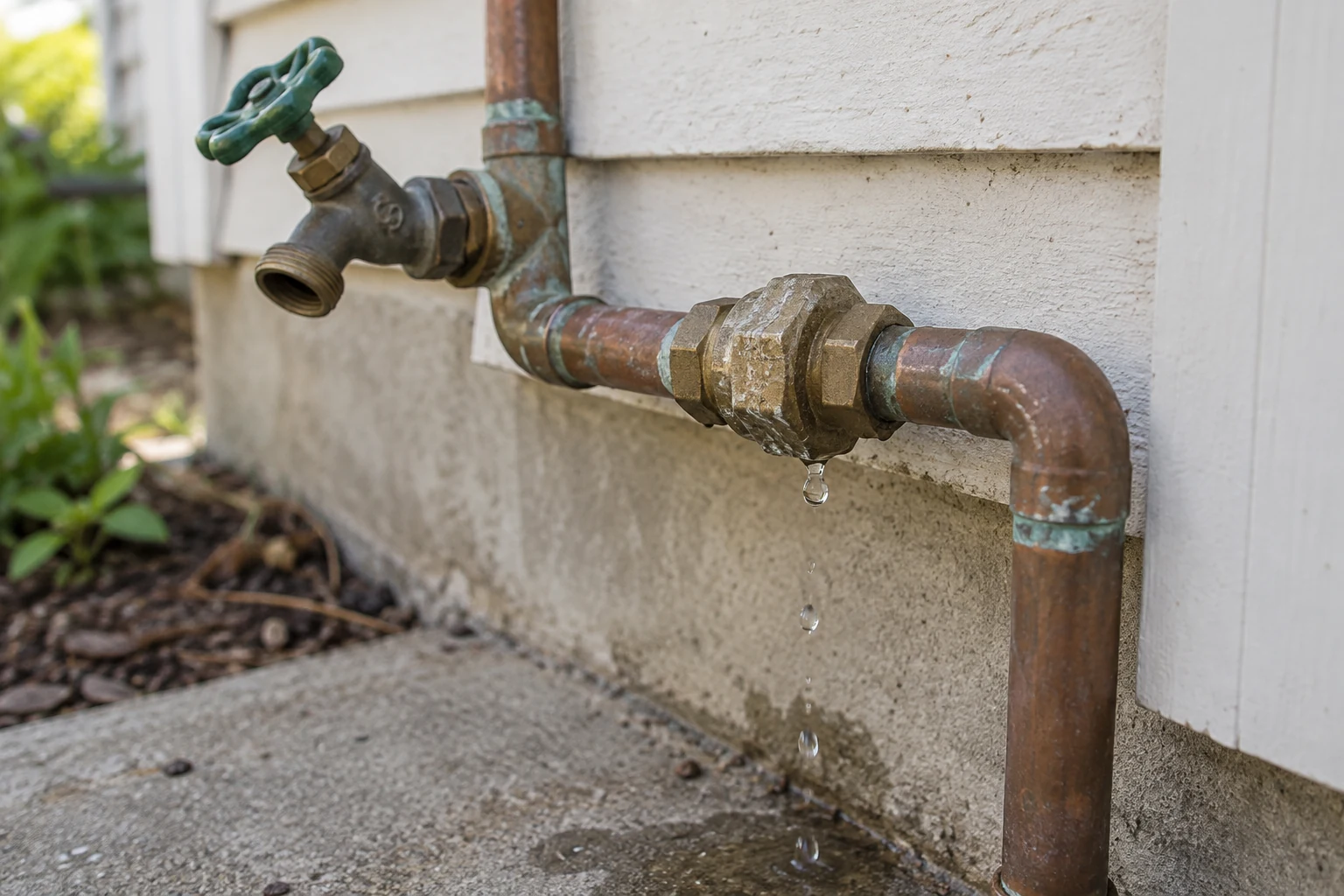
New requestOutdoor pipe dripping
There’s a drip from the pipe by the outdoor tap. I noticed it this morning.
Keep the tenant’s report and supporting photo with the request.
A head start on the details
A useful starting point.
You review the next step.
A visible drip has been reported at an outdoor pipe connection. A plumber can assess the source and repair needed.
Sample AI suggestions. Confirm the condition and scope before arranging work.
- Category
- Plumbing
- Priority
- Needs review
- Suggested trade
- Plumber
Details to confirm
- Confirm the location and source of the drip.
- Check access and agree the inspection time.
Bring the work into focus
The request is clear.
The decision stays with you.
Review the notes, choose who should handle the work and confirm the scope before assigning it.
- 01Review the request
Keep the tenant’s report close by.
- 02Choose your vendor
Find the right person for this job.
- 03Confirm the work
Agree the scope, timing and cost.
Outdoor pipe dripping
1842 Maple Avenue, Unit 3A, Austin, TX 78702
This sample does not create or assign work.
Fictional requests. No work orders created, calls placed or messages sent. AI features depend on your plan.
Luna, your AI phone assistant
24/7 answers.
Or after-hours support.
Let Luna answer around the clock, or cover the evenings, weekends and holidays outside your office hours. It gathers the issue details and opens a request for follow-up.
Your schedule. Luna’s coverage.
24/7 coverageLuna answers during office hours, evenings and weekends.
- Tuesday, 11 am Office hours
- Luna answers
- Tuesday, 8 pm Evening
- Luna answers
- Sunday, 10 am Weekend
- Luna answers
Sample schedule: weekday office hours and a configured team number. These controls preview coverage; they do not change your settings.
Available on eligible paid accounts once the phone line and coverage are configured.

LunaTell me what’s happening at your rental.
ResidentThe kitchen cabinet door isn’t closing properly.
LunaWhen did you first notice it?
ResidentThis morning. It seems loose at the hinge.
The right details for the right person
Less explaining.
A clearer scope.
Keep the report, supporting photo and proposed work together. Choose your vendor with the job in view.
- Review the scope and quote
- Choose a connected vendor or outside contractor
- Keep work updates with the ticket

Kitchen cabinet door
- Report and supporting photo
- Scope to confirm with the vendor
- Access and timing to agree
Keep the repair connected
One place to follow
what happens next.
Keep the request and its updates together, so the next conversation starts with the context you already have.
- See the status of open requests
- Review work and completion details
- Keep a record for the rental
Kitchen cabinet door
1842 Maple Avenue, Unit 3A
Austin, TX 78702
-
Reported by the tenant
Description recorded; photo added.
-
In review
Confirming the scope of the repair.
-
Assign a vendor
The next step, once the work is agreed.
A few things to know
Clear answers.
A better next step.
How do tenants report a maintenance issue?
Tenants can submit a request and describe the issue through their portal. You can also create a request and add a supporting photo from your maintenance workspace. An enabled Luna phone line gives eligible accounts another way to collect the details.
What does AI add to a request?
Eligible AI tools can suggest a summary, category, urgency and trade from the reported details. Review those suggestions before deciding the work needed; they are a starting point for your assessment.
Can Luna help without creating a ticket?
Yes. For a routine issue, Luna can suggest an appropriate low-risk check and ask whether it helped. If the tenant confirms it is fixed, no maintenance request is needed. If it still needs attention, Luna prepares an editable request for the tenant to review and send.
Can Luna answer after hours and on weekends?
Yes. An enabled phone line can use 24/7 coverage or an after-hours schedule that includes evenings, weekends and holidays. During your office hours, after-hours coverage can route calls to your configured team number.
Does the AI phone line come enabled?
No. Luna phone intake requires an eligible paid account and an enabled, configured line. Learn more about Luna and compare plans.
Can I choose my own vendor?
Yes. Review the job and choose a connected vendor or outside contractor through the maintenance workspace. Confirm the work and any quote before issuing the work order.
Can tenants follow their requests?
Tenants can see their maintenance requests and status updates in the portal. You can review the work record in your maintenance workspace.
Does this preview create a real request?
No. These are fictional requests for exploring the page. The sample keeps edits here and does not create work orders, contact a vendor or place a phone call.
A little less back and forth
Give the next repair a clear next step.
Bring the people, the request and the work together in Rentari.