Keep rent conversations clear
Review lease charges and payments with the resident's agreed online or offline payment process in mind.
Senior living
Keep senior housing rental operations connected, from rent records to repair follow-up and property expenses. Coordinate around residents' communication needs while clinical and care workflows stay in dedicated systems.
 THE PROPERTY AT THE CENTER
THE DETAILS THAT MAKE THE DIFFERENCE
Review lease charges and payments with the resident's agreed online or offline payment process in mind.
Connect the request to the right unit and coordinate the next step through the agreed communication channel.
Review rental operating expenses and supporting records when preparing your property reports.
See the work, step by step
Follow the rental journey in Rentari. Choose a chapter or play the walkthrough. Product screens use sample data; illustrated steps explain the workflow.
Step 1 of 3
Check charges and payments for the resident’s lease. Confirm online payment readiness and any agreed offline payment process.
Review rent activity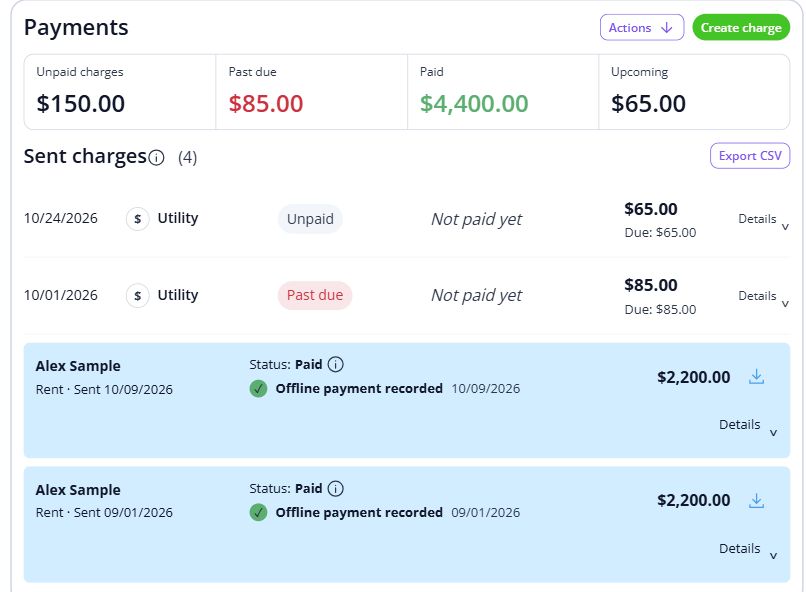
Step 2 of 3
Review the request and affected unit. Coordinate the next step and keep the resident informed through the agreed channel.
Coordinate a maintenance visit
Step 3 of 3
Review property expenses and supporting records. Keep rental operating costs organized for reporting.
Record a property expense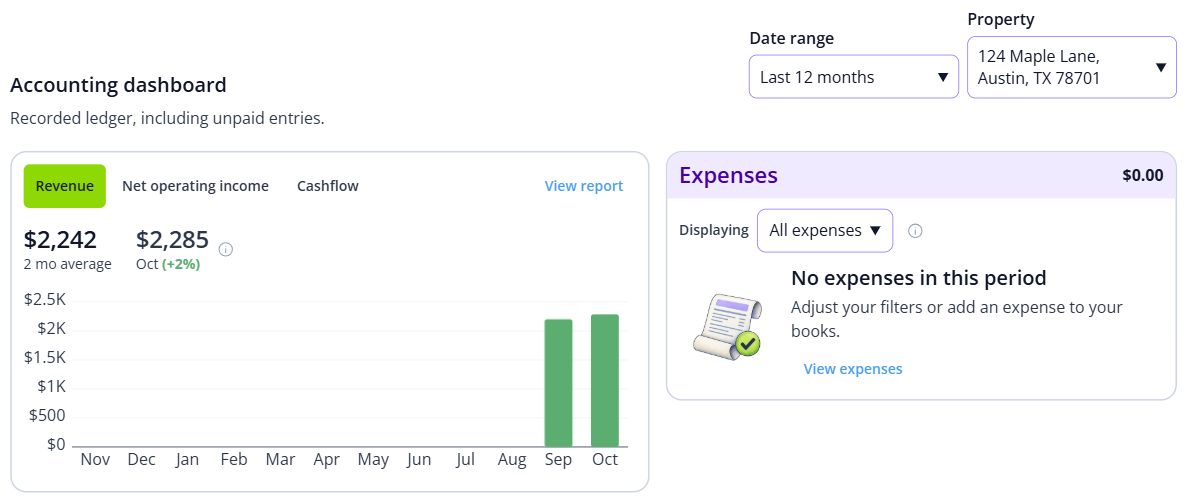

BEHIND EVERY PROPERTY, PEOPLE
A comfortable home and attentive rental operations leave room for everyday independence. Keep the records and everyday conversations connected, so the next person has the context they need.
Built around your portfolio
For the rental operations of senior housing, including property records, rent, repairs and books.
Explore the sample workspaceConfirm accessible communication and payment arrangements for your residents. Clinical records, medication and care planning belong in dedicated care systems.
Discuss your requirementsStart with one property
Have these details ready: resident and unit records; communication and payment arrangements; property service contacts.
 01
01Add the property and units, then check their details before bringing in residents.
Property setup guide 02
02Review the agreements, opening records and payment readiness for the first tenancy.
Review lease setup 03
03Invite residents once the records are ready, and show them how to find rent, documents and repairs.
Tenant invitation guideHelp, right when you need it
Open a step-by-step article with product guidance.
This page covers rental property operations. It does not describe clinical records, care plans, medication administration or medical billing.
Gather resident and unit records, communication and payment arrangements, property service contacts. Start with one property, check the records, and then bring in the rest of your portfolio.
No. It uses product screens with sample data. Open the linked Help guides for the steps to follow in your own account.
Review the current pricing page for unit limits, included tools and any payment or screening fees. Check the workflows you need before choosing.
See plans and feesExplore your options
Your next step
Start with one property and a workflow you can see.