Keep the tenancy in view
Review the unit's lease, charges and payer information alongside current supporting records.
Affordable housing
Keep the rental side of affordable housing organized around the household. Bring rent activity, tenancy documents and property reports together, with specialized program requirements reviewed separately.
 THE PROPERTY AT THE CENTER
THE DETAILS THAT MAKE THE DIFFERENCE
Review the unit's lease, charges and payer information alongside current supporting records.
Keep relevant tenancy files together and check access before sharing them.
Choose the property and reporting period, then reconcile the source records before using them in program reporting.
See the work, step by step
Follow the rental journey in Rentari. Choose a chapter or play the walkthrough. Product screens use sample data; illustrated steps explain the workflow.
Step 1 of 3
Open the unit’s lease and charges. Check the resident and subsidy information against the current agreement and payment records.
Review rent charges and activity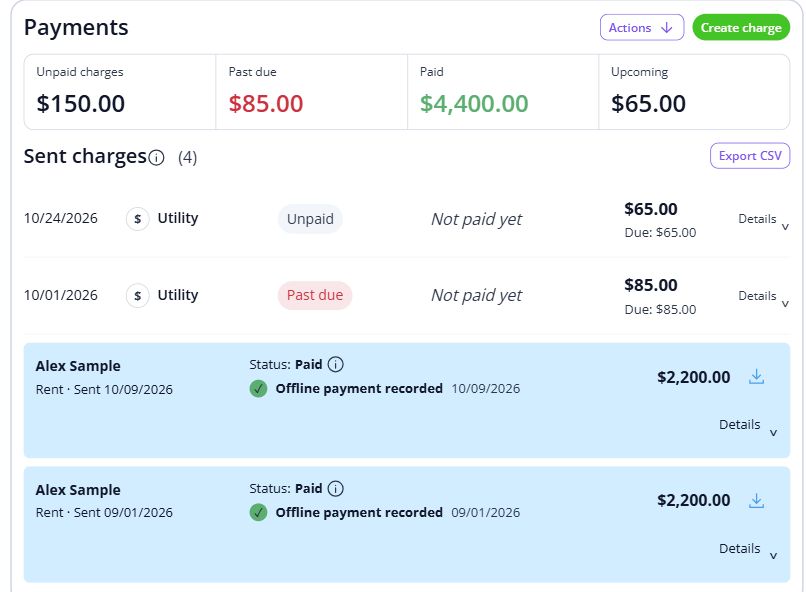
Step 2 of 3
Keep the relevant tenancy documents together and review their access settings before sharing.
Check document access
Step 3 of 3
Choose the property and dates for the report. Reconcile the underlying records before using the output in a broader program report.
Run a property report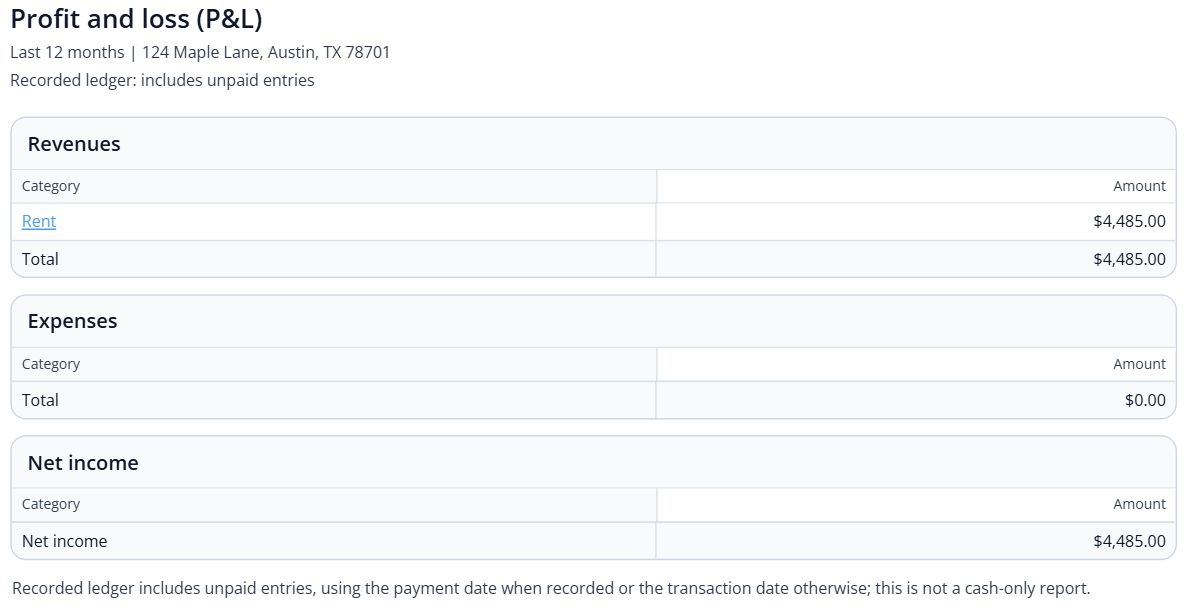

BEHIND EVERY PROPERTY, PEOPLE
Well-kept homes and clear communication help a community feel cared for. Keep the records and everyday conversations connected, so the next person has the context they need.
Built around your portfolio
For landlords organizing the rental side of affordable housing: tenancy records, payments and documents.
Explore the sample workspaceList your program’s required forms, recertification process and reporting outputs. Confirm each specialized requirement before moving your compliance workflow.
Discuss your requirements HUD housing program information (opens in a new tab)Start with one property
Have these details ready: current rent and payer information; program and tenancy documents; recertification dates and required reports.
 01
01Add the property and units, then check their details before bringing in residents.
Property setup guide 02
02Review the agreements, opening records and payment readiness for the first tenancy.
Review lease setup 03
03Invite residents once the records are ready, and show them how to find rent, documents and repairs.
Tenant invitation guideHelp, right when you need it
Open a step-by-step article with product guidance.
The example covers rental records and documents. Program certifications, submissions and reporting vary; confirm the exact workflow and supported outputs with our team before relying on them.
Gather current rent and payer information, program and tenancy documents, recertification dates and required reports. Start with one property, check the records, and then bring in the rest of your portfolio.
No. It uses product screens with sample data. Open the linked Help guides for the steps to follow in your own account.
Review the current pricing page for unit limits, included tools and any payment or screening fees. Check the workflows you need before choosing.
See plans and feesExplore your options
Your next step
Start with one property and a workflow you can see.