Set the scope of your review
Choose the property and reporting period so the numbers cover the rentals you intended.
Investment management
Connect rental operations with the records behind your owner reports. Review property income, expenses and supporting documents in context, and confirm any separate fund administration requirements with the team.
 THE PROPERTY AT THE CENTER
THE DETAILS THAT MAKE THE DIFFERENCE
Choose the property and reporting period so the numbers cover the rentals you intended.
Review income, expenses, categories and receipts before finalizing your property books.
Select the report, review its figures and export the output for the intended recipient.
See the work, step by step
Follow the rental journey in Rentari. Choose a chapter or play the walkthrough. Product screens use sample data; illustrated steps explain the workflow.
Step 1 of 3
Open the property record and confirm which rentals belong in the review. Check the reporting period before comparing results.
Organize property records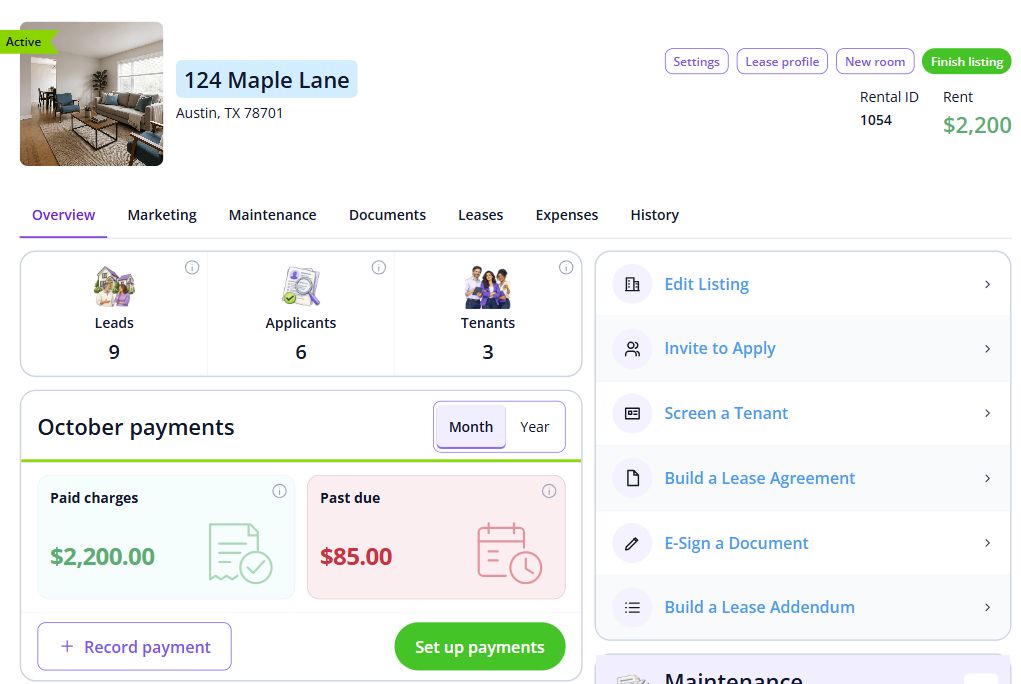
Step 2 of 3
Use the accounting view to inspect income and expenses. Check categories and supporting receipts before finalizing your review.
Add an expense with its receipt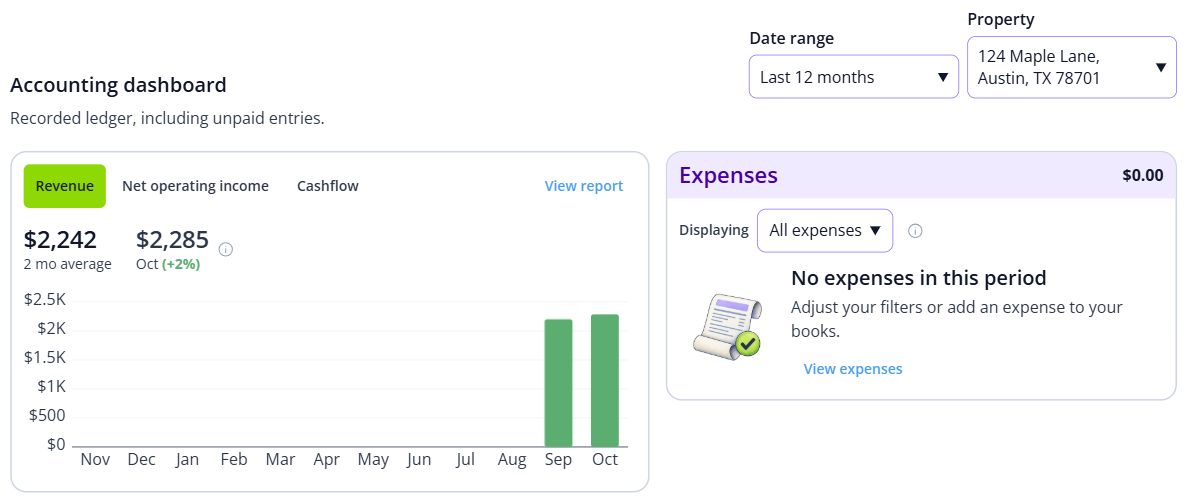
Step 3 of 3
Select the appropriate report and period. Review the figures and export the output for the intended recipient.
Run owner reports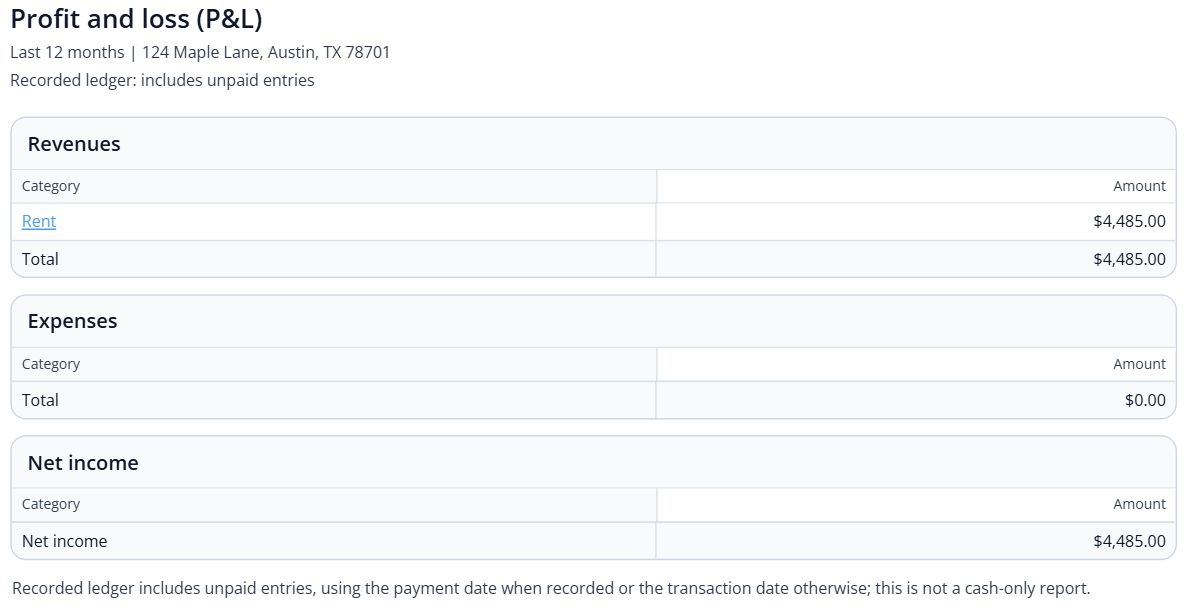

BEHIND EVERY PROPERTY, PEOPLE
Keep the people and places behind the portfolio in view alongside the property books. Keep the records and everyday conversations connected, so the next person has the context they need.
Built around your portfolio
For rental owners and managers reviewing property operations, books and owner reporting.
Explore the sample workspaceConfirm the reports, owner allocations and exports you need. Discuss fund accounting, investor capital accounts or distribution waterfalls separately.
Discuss your requirementsDefine the job the investment should do. Record the income goal, cash available, time commitment and risks you can carry before comparing property counts. Review ongoing cash flow separately from a possible future sale. Appreciation and refinancing depend on future conditions; plan how the property would operate if neither improves the outcome.
Compare evidence on the same basis. Keep dated rental comparables, property condition, financing terms, association documents and operating-cost estimates with the scenario. Investigate outliers rather than averaging unlike properties. Use the rental property calculator to compare the entered loan, income and expense assumptions, then test lower rent, greater vacancy and higher repair costs.
Check the work behind the return. Consider travel, maintenance access, rental restrictions, association charges and who will handle residents and exceptions. A simpler property may reduce some tasks without eliminating risk. Reconcile actual income and expenses against the plan as operations develop; a report or calculator result does not establish a suitable purchase.
Define a result you can measure. Choose one goal, explain why it matters and record the starting position, target and review date. Check it against available cash, time, responsibilities and downside risk. For example, preparing reconciled records for one property by an agreed date is more actionable than simply wanting a bigger portfolio. A property-count or income target is a planning choice, not a forecast.
Name the next milestone and likely blockers. Break the goal into a small task with a responsible person and a date. List missing records, skills, capacity or approvals, then choose a practical response and backup. Ask a peer or qualified professional for the particular help needed. Review any automation with real records and human approval boundaries before counting on time savings.
Review evidence and adjust the plan. At the checkpoint, compare completed work, actual costs and remaining risks with the baseline. Record what changed and whether to continue, revise or pause. Recognize useful progress without treating a purchase, loan approval or polished report as proof of a return. Keep the next step small enough to manage alongside current resident and property responsibilities.
Start with one property
Have these details ready: property and owner structure; opening income and expense records; required reports and reporting periods.
 01
01Add the property and units, then check their details before bringing in residents.
Property setup guide 02
02Review the agreements, opening records and payment readiness for the first tenancy.
Review lease setup 03
03Invite residents once the records are ready, and show them how to find rent, documents and repairs.
Tenant invitation guideHelp, right when you need it
Open a step-by-step article with product guidance.
The example demonstrates rental property records and reports. Confirm any fund-level accounting, capital-account or investor-distribution requirements with our team before selecting a setup.
Gather property and owner structure, opening income and expense records, required reports and reporting periods. Start with one property, check the records, and then bring in the rest of your portfolio.
No. It uses product screens with sample data. Open the linked Help guides for the steps to follow in your own account.
Review the current pricing page for unit limits, included tools and any payment or screening fees. Check the workflows you need before choosing.
See plans and feesExplore your options
Your next step
Start with one property and a workflow you can see.