Add supporting files to a lease
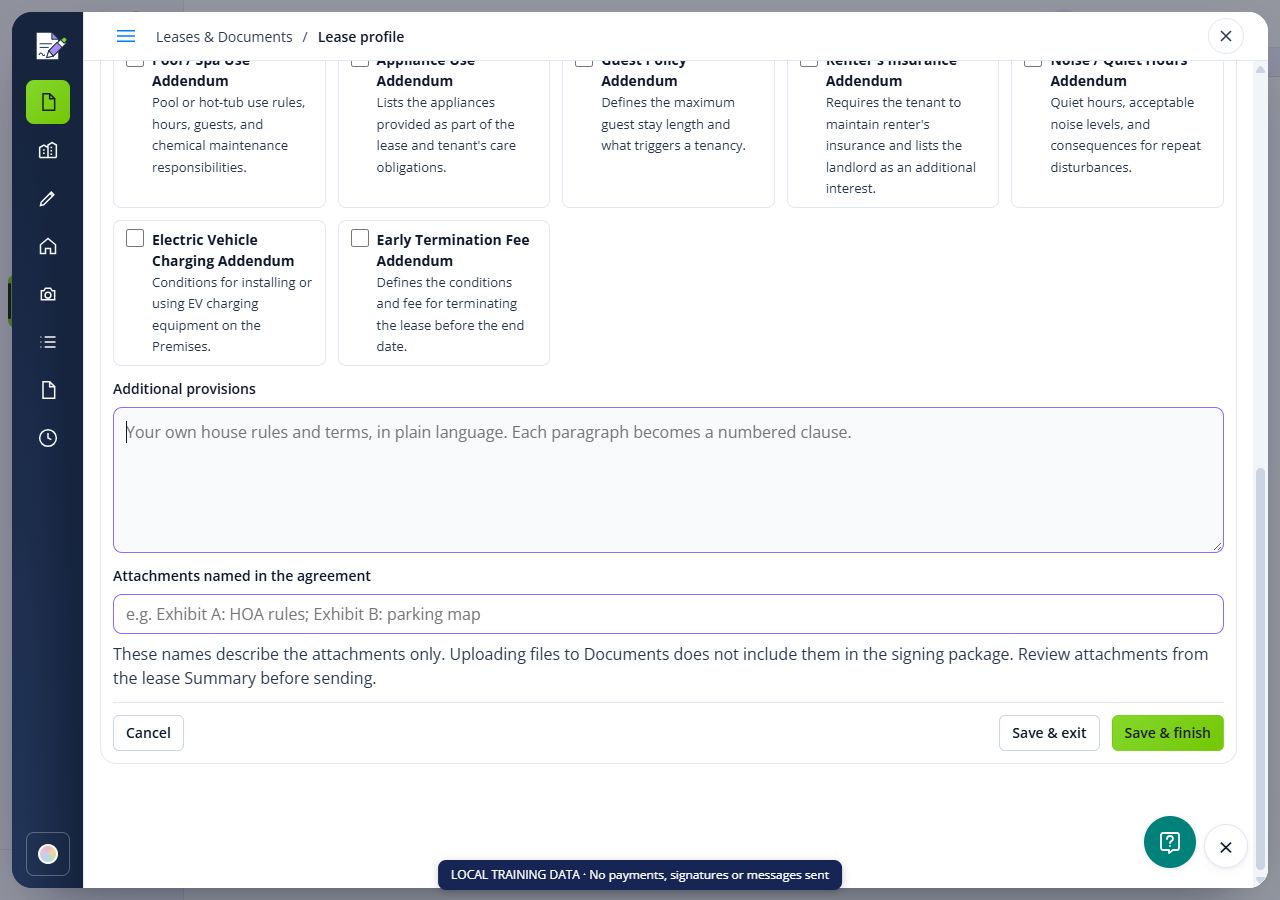
Name the attachments in the agreement, upload the actual files and review the package before sending.
On this page
Identify the supporting files
Prepare the intended documents, such as applicable disclosures, property rules or a parking map. Confirm that they belong to the rental and can be shared with its signers.

Name the attachments
In Provisions & Attachments, enter the names under Attachments named in the agreement. Save the section. This records names only; it does not upload files.
Add the actual files
Open the lease Summary and use Add supporting file when offered. Select the files and review the rental and attachment setting before uploading. A general upload to Documents does not automatically include a file in a signing package.
Check the prepared package
Reopen the lease and its signature preparation. Confirm that each intended file is present, readable and the correct version before sending. Correct a missing or wrong file in the draft package and follow any restrictions shown after sending.
Check the result
- Review the saved draft or document package and its actual signing status before taking the next step.
FAQs
Why is the named attachment missing from the package?
The attachment-name field describes a file; it does not upload it. Add the actual file through the lease Summary attachment workflow, then review the prepared package.
Does uploading to Documents include the file in every lease?
No. Confirm the selected rental, attachment setting and prepared signing package. Storing a document alone does not include it in a signature request.
Can a new upload replace an attachment already signed?
Do not assume it does. Preserve the signed package and use the appropriate new agreement or addendum workflow when a change needs signatures.