Rentari state-specific lease agreements
Find all 50 state lease guides, D.C., city and county checklists, and a screenshot walkthrough of Rentari’s lease builder.
On this page
What goes into your lease
Rentari uses the rental location and your saved answers to prepare a residential lease draft. Check the full address, unit and state before building the agreement. Read the completed draft and any local requirements before sending it for signature.
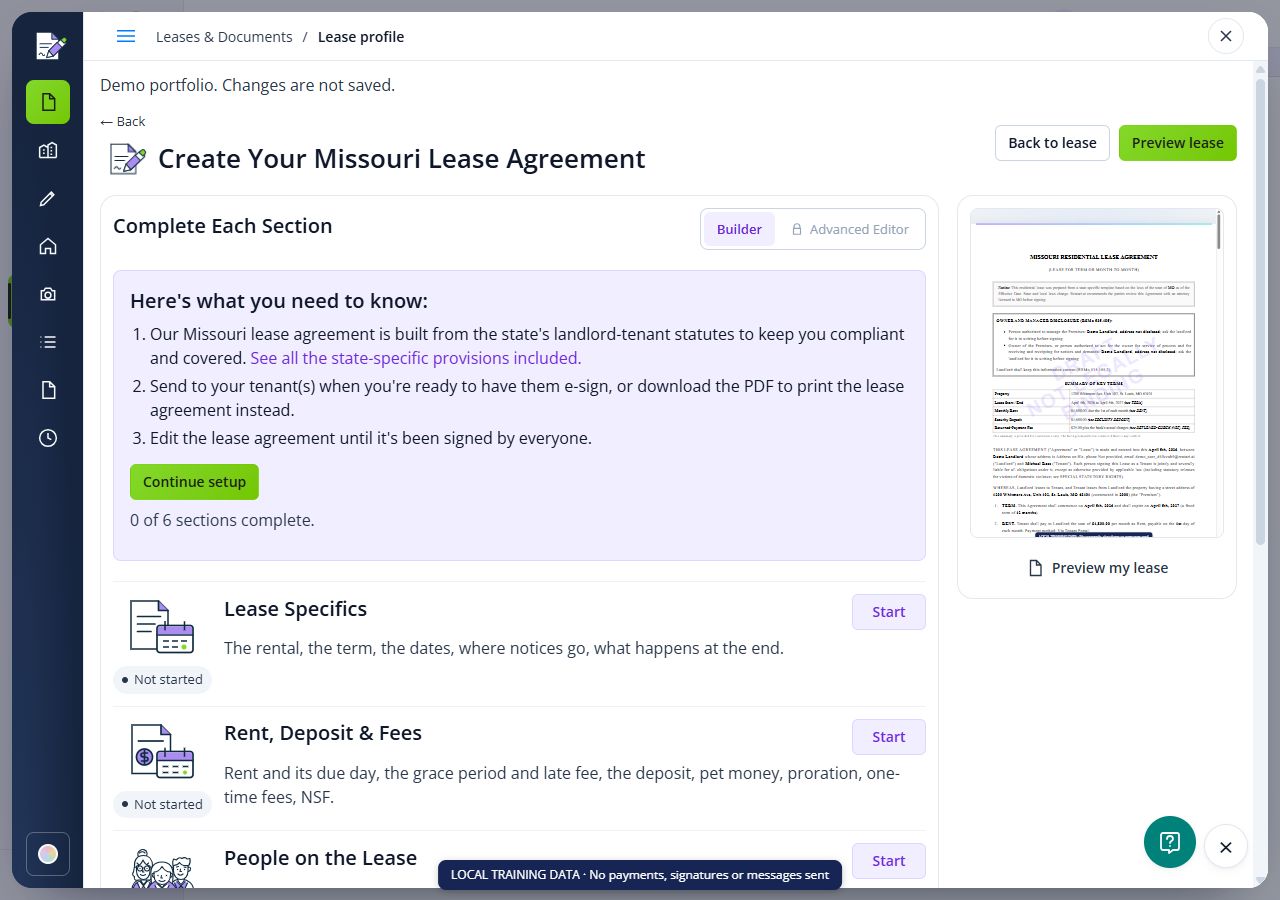
- Lease Specifics: rental address, unit, start and end dates, and tenancy type.
- Rent, Deposit & Fees: rent, due date, deposits, prorated first-month rent, pet charges, permitted one-time fees and payment terms.
- People on the Lease: tenants, other occupants, co-signers, additional signers and contact details.
- Pets, Smoking & Other: pet and smoking rules, renters insurance, parking and early termination terms.
- Utilities, Maintenance & Keys: responsibilities for services, upkeep and access.
- Provisions & Attachments: location-specific questions, available addenda, additional provisions and attachment names.
Save the rental details
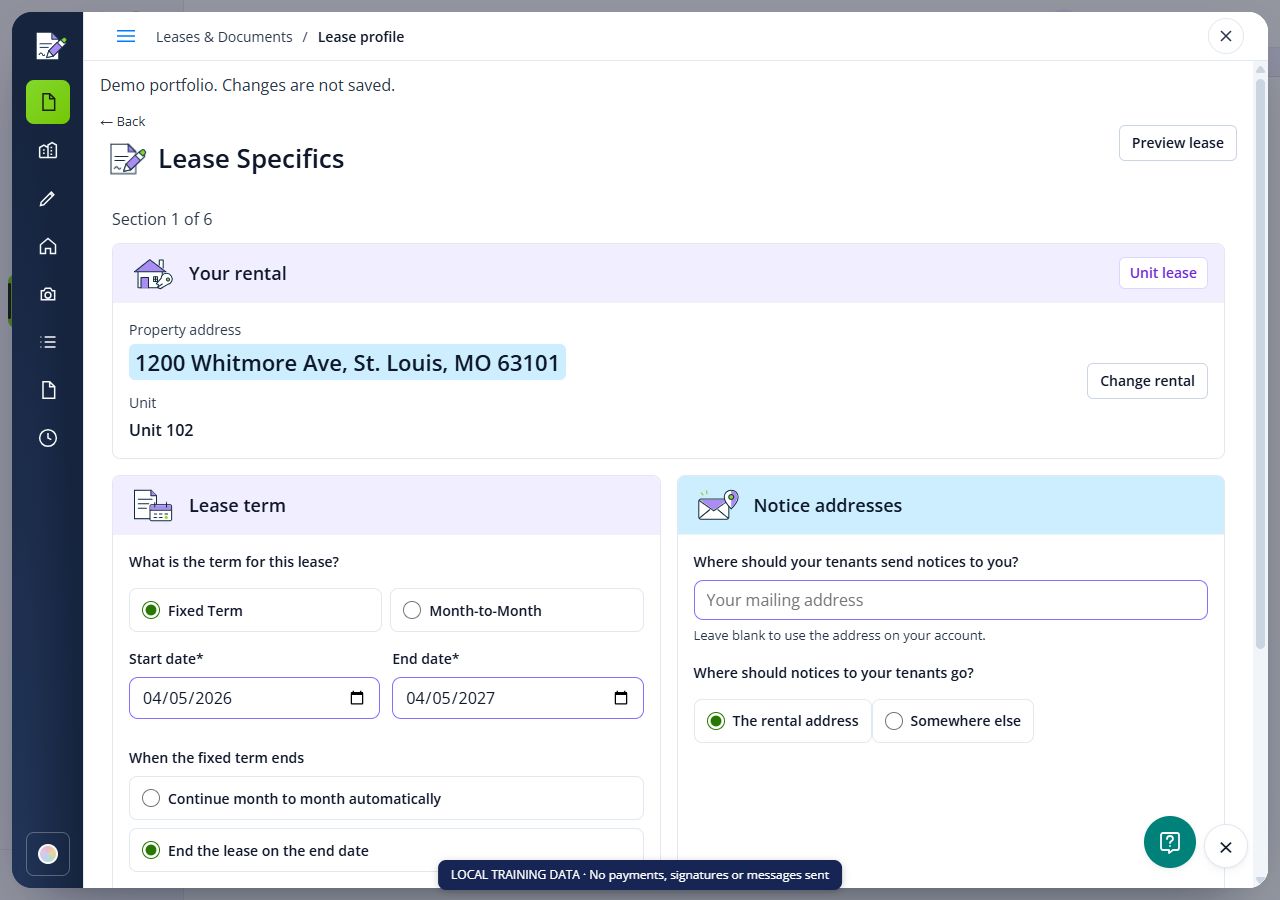
Start from the lease profile for the rental. Check its full street address, unit and state in Lease Specifics. Choose the tenancy type, dates and what should happen at the end of a fixed term. Review the notice address and any location options shown. Save the section before continuing.
Set rent, deposits and responsibilities
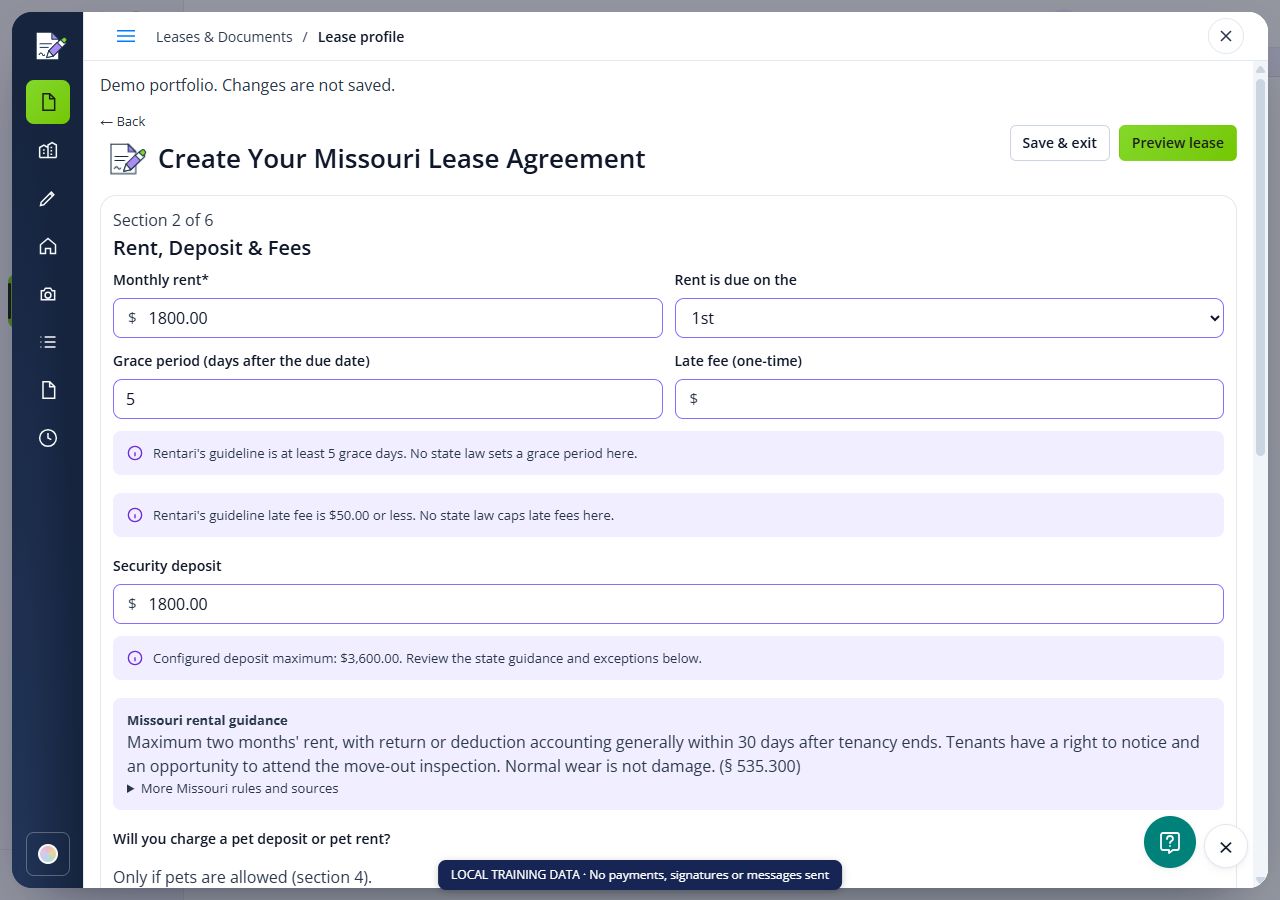
In Rent, Deposit & Fees, enter the rent, due date, deposit, permitted charges and payment terms. Review any state guidance displayed beside the fields. Add the people who will sign or occupy the rental, then save pet, smoking, utility, maintenance and key responsibilities in their sections.
Follow Build a lease agreement for the complete workflow.
Customize the agreement
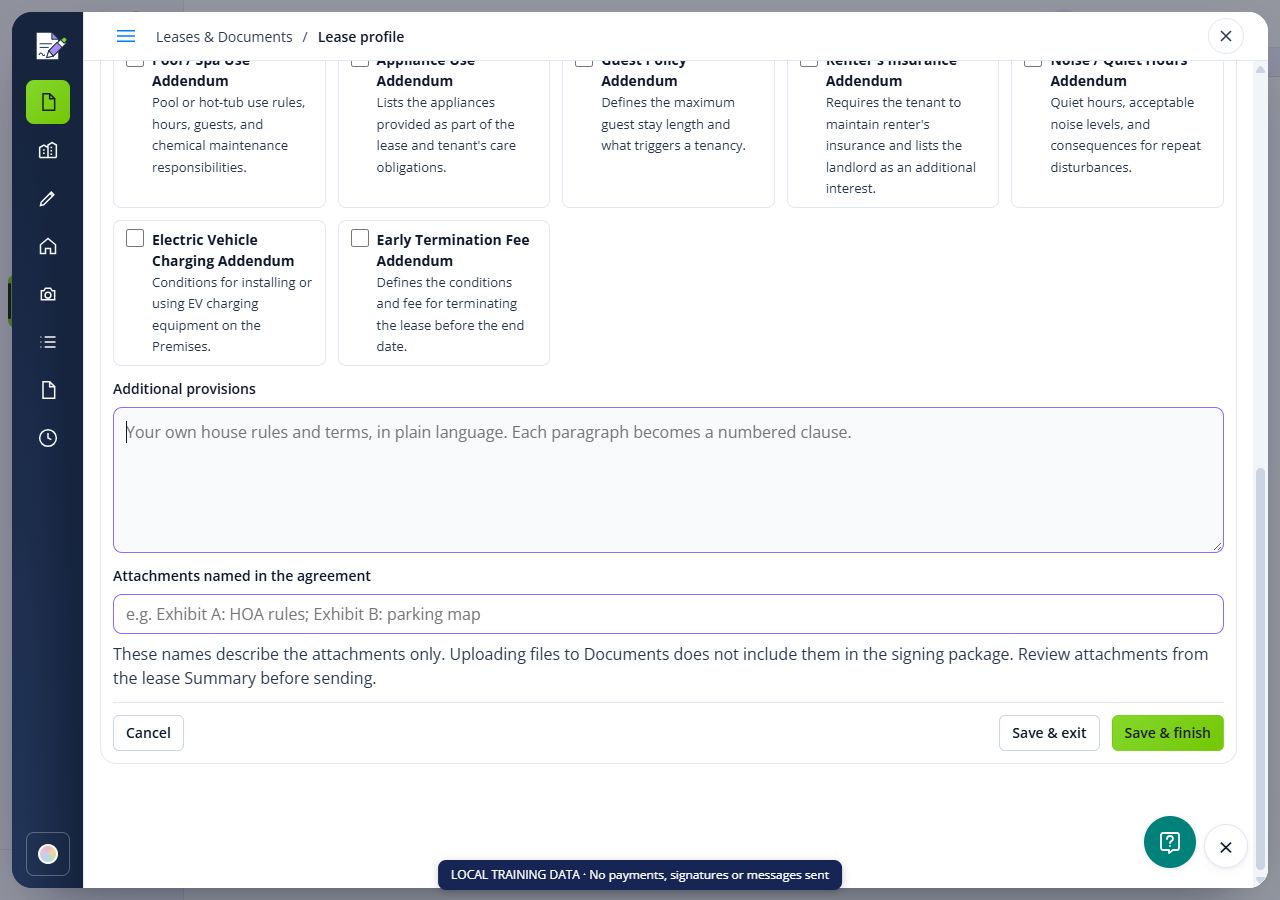
Enter house rules and property terms under Additional provisions in Provisions & Attachments. Save the section and read the preview. Your wording must work with the rest of the agreement and applicable law; adding a provision does not make a prohibited term enforceable.
See Customize a lease agreement. For a change after signing, use a lease addendum and review who needs to sign.
Disclosures and supporting files
Answer the disclosure questions shown for your rental. Review the draft for the disclosures and addenda it actually includes. Some requirements depend on the building, tenancy or locality, so a state-specific draft still needs review.
Typing an attachment name does not upload its file. Use the attachment workflow from the lease Summary and check the prepared package before sending. See Add supporting files to a lease.
State-specific lease agreements
Choose the state where the rental is located. All 50 state guides and D.C. include required disclosures, deposits, rent and fees, access, repairs, lease violations, termination, renewal guidance, FAQs and links to the reviewed statutes. City and county links open the local checklist within the state guide.
- Alabama lease agreement
- Alaska lease agreement
- Arizona lease agreement
- Arkansas lease agreement
- California lease agreement
- Colorado lease agreement
- Connecticut lease agreement
- Delaware lease agreement
- Florida lease agreement
- Georgia lease agreement
- Hawaii lease agreement
- Idaho lease agreement
- Illinois lease agreement
- Indiana lease agreement
- Iowa lease agreement
- Kansas lease agreement
- Kentucky lease agreement
- Louisiana lease agreement
- Maine lease agreement
- Maryland lease agreement
- Massachusetts lease agreement
- Michigan lease agreement
- Minnesota lease agreement
- Mississippi lease agreement
- Missouri lease agreement
- Montana lease agreement
- Nebraska lease agreement
- Nevada lease agreement
- New Hampshire lease agreement
- New Jersey lease agreement
- New Mexico lease agreement
- New York lease agreement
- North Carolina lease agreement
- North Dakota lease agreement
- Ohio lease agreement
- Oklahoma lease agreement
- Oregon lease agreement
- Pennsylvania lease agreement
- Rhode Island lease agreement
- South Carolina lease agreement
- South Dakota lease agreement
- Tennessee lease agreement
- Texas lease agreement
- Utah lease agreement
- Vermont lease agreement
- Virginia lease agreement
- Washington lease agreement
- Washington, D.C. lease agreement
- West Virginia lease agreement
- Wisconsin lease agreement
- Wyoming lease agreement
City and county requirements
City and county requirements can add forms, deposit rules, licensing and notice duties. Use the links under Illinois, Maryland, New York, Vermont and Washington for the named local checklists. Verify the rental location in the builder, review the generated agreement, and add any applicable documents that are missing. A local guide does not mean every local rule is automatically built into the agreement.
Check the rules behind each proposed term
A state label identifies a starting point. Review the actual address, city, property type, tenancy and any housing program before relying on a carried-over clause. Use the state and local guide links above, then check current official sources and record any missing requirement for qualified review. A summary table or a blank field does not establish that no restriction exists.
- Money and disclosures: check required disclosures, deposit handling and return, rent-increase requirements, permitted charges and any late-fee waiting period.
- Access and repairs: check entry reasons, notice and emergency rules, repair and habitability duties, and any legally protected remedies. Do not add a blanket rent-withholding or repair-rights waiver.
- Ending or changing the tenancy: review renewal, termination grounds, notice and delivery requirements, protected early-termination rights and the effect of any proposed amendment.
When adapting a generic form or using an agreement from another rental, check every term and attachment against this tenancy. Obtain qualified local review of missing disclosures, uncertain clauses or conflicting attachments before signature preparation. A software change does not amend a signed agreement or serve a later tenancy notice. Use the clause source log to keep the authority and unresolved question together.
Keep federal requirements in the review
State and city review does not replace federal requirements. For covered older housing, EPA's lead-disclosure guidance requires the applicable information before the renter signs, including known lead information, available records, the pamphlet and disclosure statement. Check the listed exceptions for the actual property rather than assuming every older rental has the same requirements.
Review fair-housing and accommodation duties separately from ordinary house rules. For military-related departure, consult DOJ's SCRA housing guidance for qualifying residential lease-termination protections and required notice/documentation; a general early-departure clause does not decide those rights. Complete the existing preview and signature-preparation steps only after resolving the applicable review.
Preview the completed agreement
Save each section and review the completion checklist. Choose Review & generate to review the draft, check its terms and included addenda, and finish generating the document. Review the actual generated agreement before preparing signatures. Correct missing information while the agreement is still unsigned.
For a fixed term, confirm the end date and renewal clause. For month-to-month, review the applicable notice periods. A room rental uses the state lease with the room identified as a unit and the relevant house rules; review any additional local requirements.
Standard lease guide, month-to-month lease guide, and room rental guide.
Prepare, sign and keep your lease
- Create and review a new agreement
- Send a generated lease for signature
- Download or print your lease
- Use your own agreement for e-signature
- Review an agreement with the AI lease audit
- Explore landlord-tenant laws by state
Review before use
Rentari provides general information and document preparation tools, not legal advice. A draft, generated document or AI audit does not guarantee legal compliance. Have a lawyer licensed in the rental jurisdiction review unusual terms, local requirements or a disputed tenancy.
Find the controls in Rentari


Check the result
- Review the saved draft or document package and its actual signing status before taking the next step.
FAQs
Where do I find my state's lease agreement?
Use the state list above for all 50 states and D.C. Each link opens Rentari's state lease guide, including provisions and statute citations.
Does Rentari cover every city's lease requirements?
Do not assume complete local coverage. Read the state guide's local rules, check the rental location and any local options shown in the builder, and verify additional requirements for your property.
Can I use a lease I already have?
Yes. Upload your file to Documents or prepare it for e-signature using the separate upload and signature-field workflow. Uploading alone does not send it.
Are signature requests included on the free plan?
Sending for signature is included on paid plans. The free plan does not include sending for signature. Review your current plan before sending.
What makes a lease state-specific?
It addresses requirements for the rental's state, but still needs review for the actual city, property, tenancy, federal requirements and any housing program. A state label or AI result does not certify that every applicable clause and disclosure is included.
Can I reuse one lease across different states?
Review each destination rental independently. A saved starting form can contain useful structure, but its amounts, clauses, disclosures and attachments must be checked against that rental's current requirements before signature preparation.
Can a generic form be adapted for my rental?
It can be a starting point for review. Verify all terms and attachments, resolve contradictions and obtain qualified local help for uncertain wording. Editing a form or generating a document does not establish enforceability.
What should I do if a required clause or disclosure is missing?
Pause signature preparation, identify the applicable requirement and resolve the omission with qualified local review. Consequences depend on the law and facts. If the agreement is already signed, preserve it and use the required correction or amendment process instead of silently replacing it.